Jupiter ERP

Service

Maintenance contracts

Plan recurring maintenance automatically and never miss a visit.

Create maintenance contracts with an interval and prefilled line items. Jupiter ERP turns due periods into maintenance orders or invoices, automatically or on demand. On site you capture the report; in the office you bill the same order.

Note: Enterprise and trial

Serviceverträge im Jupiter ERP Panel

At a glance

These are the points this feature covers day to day.

  • Plan recurring maintenance automatically
  • Never miss a maintenance visit again
  • On-site report, bill from the same order
  • Intervals in days, weeks, months, or years

In the product

The workflow in Jupiter ERP, on this page.

In depth

Background, typical workflows, and concrete panel capabilities, more detail than the summary above.

Maintenance orders that plan themselves

A maintenance contract represents recurring work: a monthly retainer, an annual inspection, or a boiler check every three months. You store the interval, contact, optional service objects, and the line items carried into every period.

As contract type you choose order or invoice. Jupiter ERP creates the next maintenance order or invoice when the period is due. You plan recurring maintenance once and stop relying on Excel lists for due dates.

Serviceverträge im Jupiter ERP Panel

Never miss a maintenance visit again

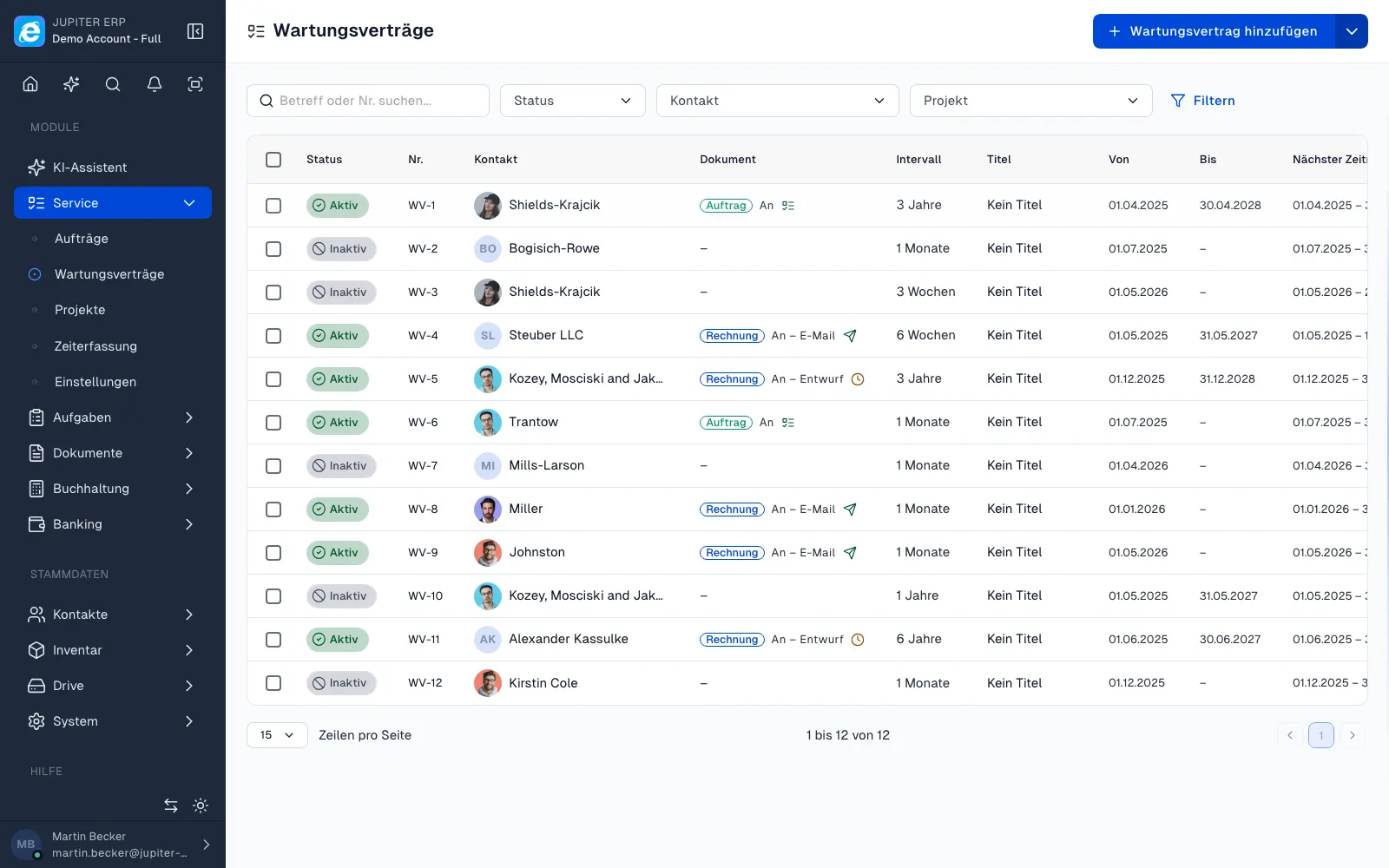
The contract list shows next creation and next period. Filters such as overdue dates help dispatchers follow up before the customer calls.

With automation enabled, Jupiter ERP checks all active contracts hourly. Invoices can be created as drafts or sent by email immediately. Orders land in the order list and can be scheduled in the team planner.

Report on site, bill in the office

The generated maintenance order is a normal service order: appointment, technician, service object, report with photos and signature in the browser or companion app, then a partial or final invoice from the same lines.

Contract master data, asset, and visits sit together. For renewals and follow-ups, the history on the contract is enough, without a parallel spreadsheet.

Automation without a black box

Follow-on documents come from the contract logic. You keep review and approval in the panel. Processing can be triggered manually at any time, instead of waiting only for the hourly run.

What you do with a maintenance contract

Maintenance and recurring work get a term and an interval. Jupiter ERP turns due periods into maintenance orders or invoices before the customer calls.

  • Set title, status, interval (days, weeks, months, years), and an optional end date
  • Choose contract type order or invoice and prefill line items
  • Turn on automatic creation or create the next document manually
  • Hang the contract on the contact and the service asset
  • Review the history of visits and generated documents on the contract
  • Review and release follow-on documents; nothing runs through unseen
  • Show the contract in the customer portal when the customer should look up the terms

Renewal without a side list

Contract master data, asset, and visits sit together. Whoever renews or follows up sees the history in the panel instead of in a parallel table.

Maintenance contracts belong to the service area and are included in the trial and the Enterprise plan.

How it works in the panel

The main building blocks at a glance, complemented by the longer description above.

Create a maintenance contract

Contact, term, interval, and contract type (order or invoice). Line items, subject, and texts are prefilled for every period.

Automatic order creation

With automation on, Jupiter ERP checks due periods hourly and creates the next order or invoice. You can always create the next document manually.

From visit to invoice

The generated maintenance order hangs on the contact and service object. Capture the report with photos and signature on site, then bill with a partial or final invoice from the same lines.

Due dates in view

The contract list shows next creation and next period. Filters help with overdue visits before the customer calls.

Common questions

Jupiter ERP

Your first invoice in minutes

Start for free: write invoices on the Free plan. Choose plan, term, and add-ons in the app afterwards. Custom adaptations or API integration? Get in touch.

  • 14-day trial
  • No credit card
  • Hosted in Germany
  • GDPR-compliant
Maintenance contracts · Jupiter ERP
