Jupiter ERP

AI assistant

AI assistant & AI module

Your own AI assistant that knows your business, plus AI receipt recognition, built into the panel.

The AI assistant is a chat like ChatGPT, except it knows your real company data. It answers questions about revenue, open invoices, customers, receipts, and files in your account, and explains how Jupiter ERP works. Because answers are grounded in your actual numbers and documents, they are concrete and reliable instead of generic. The Jupiter AI assistant sidebar and automatic receipt recognition are bundled in the same AI module.

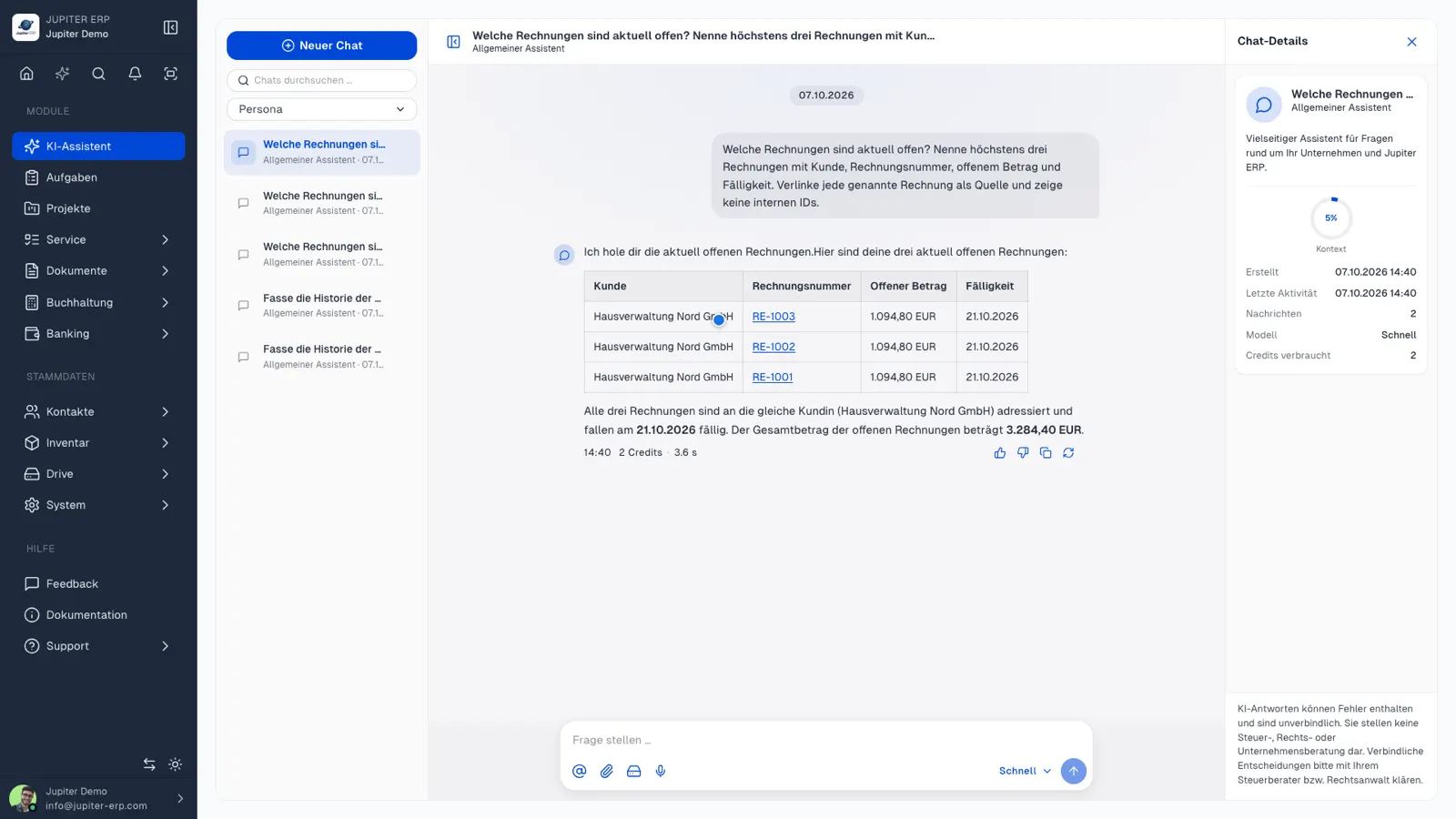
KI-Assistent im Jupiter ERP Panel — Chat mit Beraterrollen

At a glance

These are the points this module covers day to day.

  • AI chat that knows your real company data
  • Jupiter AI assistant: contextual help right on every page
  • Concrete answers instead of generic AI output
  • Advisor roles: tax, business, legal, support
  • @mentions, file attachments & metrics in context
  • Receipt recognition & e-invoice from XML
  • Private, read-only & tenant-safe

In the product

The workflow in Jupiter ERP, on this page.

Views from the panel

Screenshots from Jupiter ERP for features in this module.

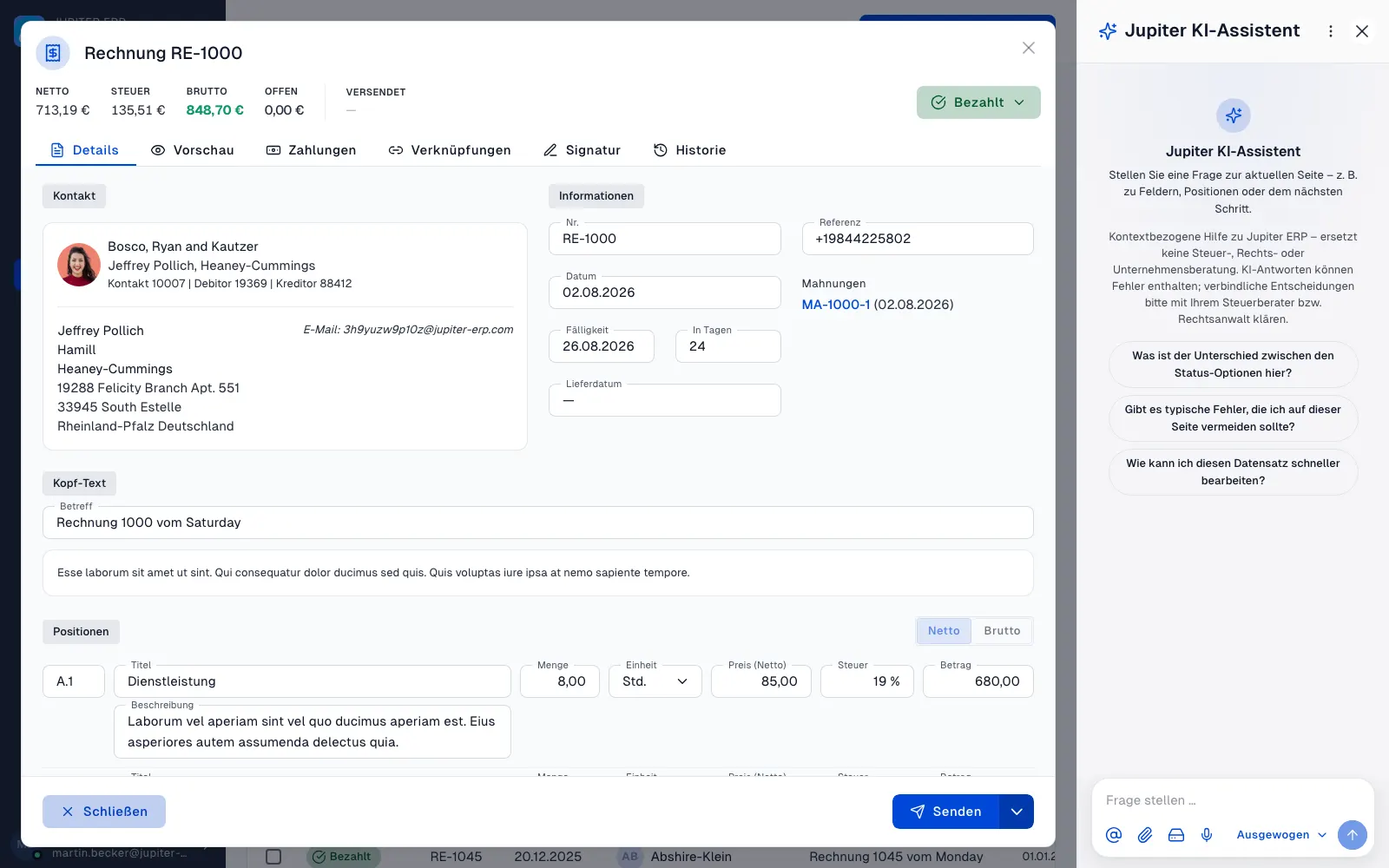
Jupiter KI-Assistent — Sidebar neben einer geöffneten Rechnung im Jupiter ERP Panel

Jupiter AI assistant: help right on the page

The sparkle icon in the header opens a narrow assistant sidebar next to any page in the panel. The Jupiter AI assistant knows the page, document, and field you're working on and answers questions about it directly. No tab switching, no re-explaining the context. Part of the AI module, not a standalone product.

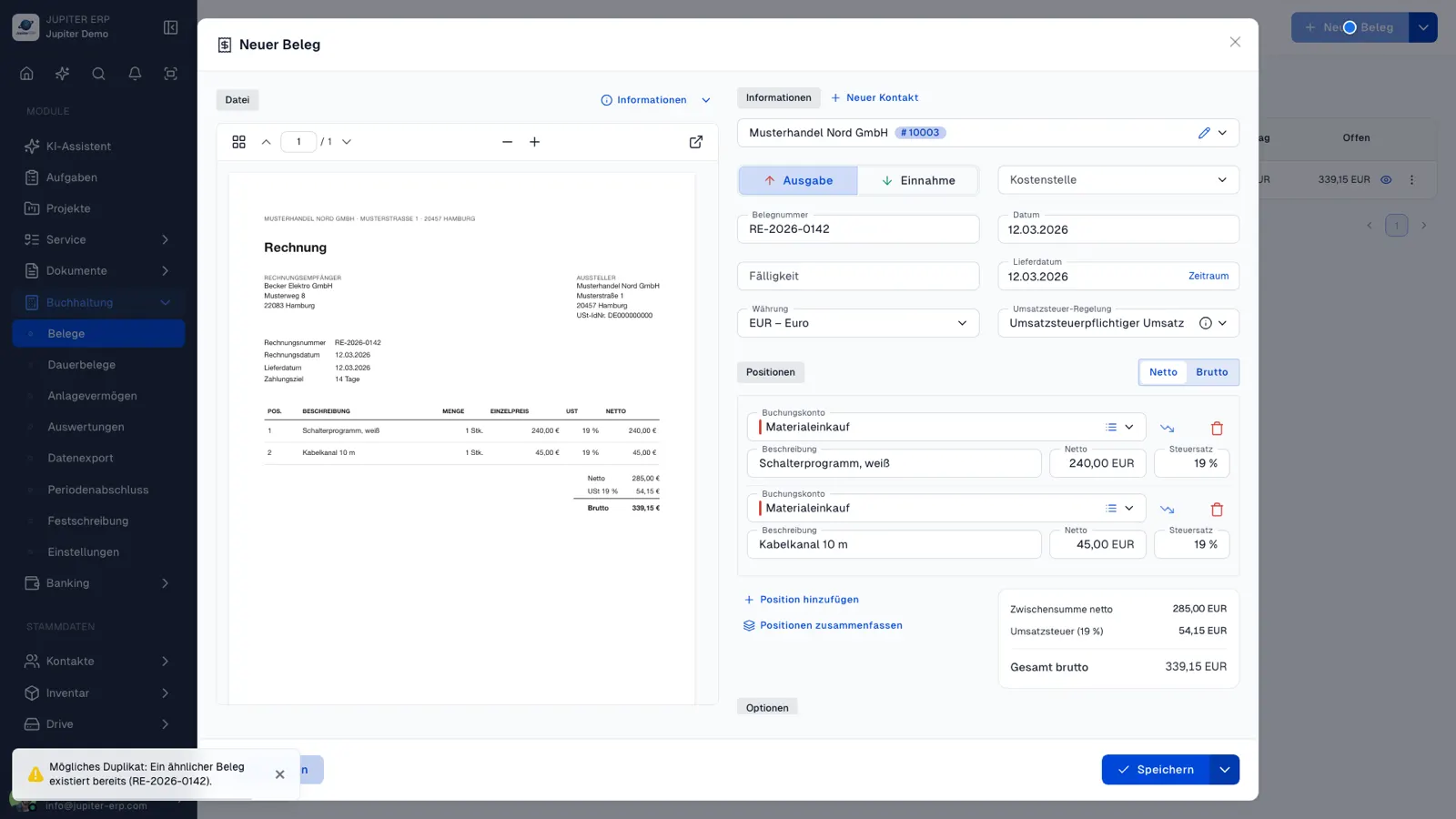
KI-Beleg-Erkennung beim Erfassen eines Kostenbelegs im Jupiter ERP Panel

AI receipt recognition

When uploading expense receipts, Jupiter ERP reads structured e-invoices directly from XML. For scans or missing fields, AI suggests contact, categories, and line items only when needed.

In depth

What the module means in practice, beyond the feature list, with concrete day-to-day value in the panel.

An AI assistant that truly knows your business

Picture a chat like ChatGPT, except it knows your real company data instead of guessing into the void. That is exactly what the AI assistant in Jupiter ERP is: a familiar chat window right in the panel where you ask in full sentences and get answers written live. The difference is what the answer is based on, not the interface.

Ask a generic AI tool “What was my revenue last quarter?” and it cannot possibly know. It knows neither your invoices nor your customers. The Jupiter ERP assistant, by contrast, reads the answer from your actual receipts and metrics. A vague guess becomes a concrete number, every statement backed by a clickable source. That is the core of the feature promise: better answers, because the data is already in the system.
KI-Assistent im Jupiter ERP Panel — Chat mit Beraterrollen

Why this helps every entrepreneur

The most important day-to-day questions can rarely be answered by a general web search or a context-free chatbot. They are about your business: Which invoices are overdue? Which customers bring the most revenue? What is still open this month? Instead of clicking through lists, filters, and exports, you simply ask, and the assistant researches it for you in your own data.

This turns AI from a toy into a tool. You save time on recurring analyses, get reliable answers even without report expertise, and keep the overview without having several modules open at once.

  • “Which invoices are currently overdue, and for which customers?”
  • “Summarize the history of Meier GmbH: revenue, open items, latest documents.”
  • “Which five customers brought me the most revenue this year?”
  • “What is in the attached PDF and does it match an open receipt?”
  • “How do I create a credit note in Jupiter ERP?” Answered from the product handbook.

ChatGPT knows nothing about you. Jupiter ERP does

General AI models are strong on world knowledge but blind to your business. They cannot name a single one of your customers, open a receipt, or compute a metric, and when pushed they will invent plausible-sounding numbers. For decisions, that is worthless.

The Jupiter ERP assistant works the other way around: it has no free rein over your database but uses controlled, strictly read-only tools to fetch exactly the information your question needs: contacts, documents of every kind, metrics and, if you wish, the contents of individual files. The answer thus stands on your real data, not on assumptions. And because it also knows how Jupiter ERP works, it can explain the matching workflow in the product on request.

Advisor roles, mentions, and files

When starting a chat you pick a role that sets the tone and focus: a tax-, business-, or legally oriented advisory, a general assistant, or the “Jupiter ERP Support” role that answers usage questions like a manual that thinks along. All roles use the same secure data access. Only the perspective changes.

In the conversation you reference a contact, a document number, or a file directly via @mention, or attach a document from your Drive. You also pick the AI model per conversation: from fast to especially powerful. A permanently visible notice makes clear that answers do not replace binding tax or legal advice.

Secure, private, and tenant-separated

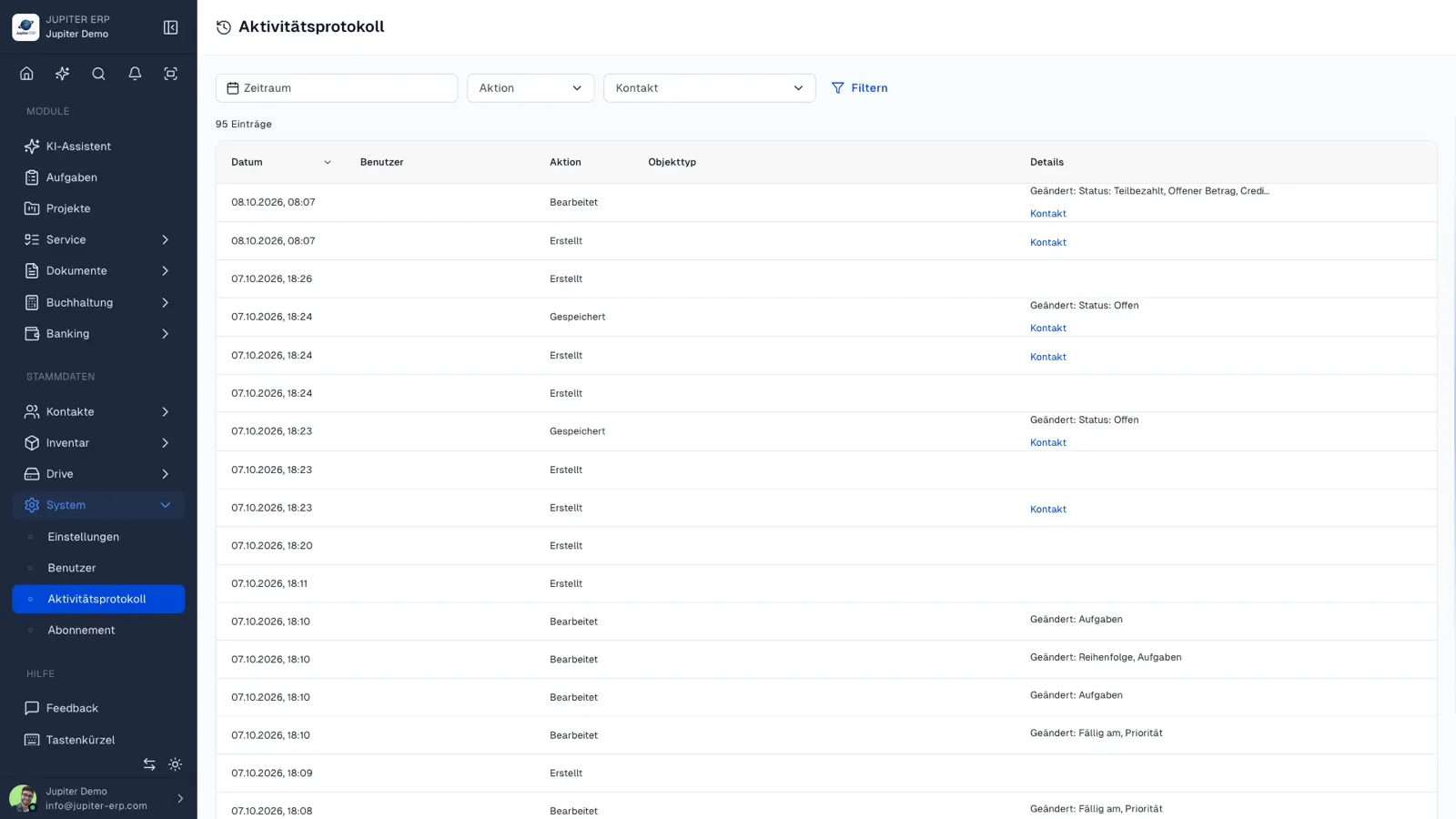
As close as the assistant works to your data, the boundaries are just as strict. Every conversation belongs to exactly one user and is not shared. The assistant can only read. It creates nothing, deletes nothing, sends nothing. And it only ever sees your own tenant: access to other accounts' data is technically impossible, not merely forbidden by instruction.

The assistant is a guided view of information you already own, just faster to reach, not a privacy risk. Every request is logged so usage stays traceable.

Aktivitätsprotokoll im Jupiter ERP Panel

Included in your plan

Assistant, Jupiter AI assistant, and receipt recognition are bundled in the AI module: included from Basic. See the pricing page for scope; usage is visible under Subscription → Features & limits in the panel.

Structured e-invoices are read automatically from XML. For scans, AI suggests missing fields. You review and confirm.

KI-Beleg-Erkennung beim Erfassen eines Kostenbelegs im Jupiter ERP Panel

What you do with the AI module

One module, three surfaces: the Jupiter AI assistant in the sidebar, AI chat, and document recognition. There is no separate licence per switch.

  • Open the assistant from the sparkle icon on the current page, without switching tabs
  • Ask about the open form, such as what is still missing before save
  • Ask chat about revenue, open items, and customers, based on account data
  • Use adviser roles and mention records or files
  • Get suggested contact, category, and lines on a cost document
  • Read ZUGFeRD and XRechnung from the XML without using AI for that read
  • Review suggestions and save or post yourself

Page context and longer questions

The Jupiter AI assistant is the narrow sidebar. It knows the page, the form, and the document. AI chat is the longer conversation, with roles and access to company data.

When you change page, you decide whether the conversation continues or starts again with the new context.

Jupiter KI-Assistent — Sidebar neben einer geöffneten Rechnung im Jupiter ERP Panel

Plan and limit

The AI module is included from Basic. The pricing page shows the exact scope per plan.

The assistant only reads your tenant. It does not see other accounts' data and does not replace review before posting.

Features in AI assistant

What you can do in this module, no fluff. Details for individual panel features are under Features.

  • AI assistant chat

    A chat right in the panel, as familiar as ChatGPT: ask in plain language, watch answers stream in live, revisit earlier conversations. “What was my revenue last quarter?”, “Which invoices are overdue?”, “Summarize the history of Meier GmbH.” The assistant answers based on your account.

  • Answers from your real data

    The decisive difference from generic AI tools: the assistant accesses your contacts, receipts, invoices, metrics, and files in a controlled, read-only way. Ask ChatGPT in general and it cannot know your business. Here the numbers come from your system. Results are backed by clickable sources so you can verify every statement.

  • Advisor roles (personas)

    When starting a chat you pick a role (e.g. tax, business, or legal advisory, a general assistant, or “Jupiter ERP Support” as a manual replacement). Each role phrases answers to fit your question; all use the same secure access to your data.

  • @mentions, files & metrics

    Reference contacts, document numbers, or files via @mention, or attach a document from your Drive. The assistant reads the content when needed, evaluates metrics, and factors in open items and top customers: in the context of your business.

  • Model choice

    You pick the AI model per conversation: fast, balanced, or especially powerful. The default is a balanced model for everyday use.

  • Included from Basic

    Assistant, Jupiter AI assistant, and receipt recognition are bundled in the AI module: included from Basic upward. See the pricing page for plan details.

  • Transparent in your subscription

    AI usage and available scope are always visible under Subscription → Features & limits in the panel.

  • Privacy & tenant separation

    Every conversation is private and bound to your user. The assistant works read-only, strictly limited to your tenant. No access to other accounts, no write actions. A notice makes clear that answers do not replace binding tax or legal advice.

Typical use cases

How teams use AI assistant day to day.

Management

Ask about revenue, open items, or the customers with the highest revenue. The answer comes from your documents, with a source you can open in the panel.

Accounting

On an expense receipt the AI suggests account and line items. You look up a contact in the chat instead of filtering the list by hand. You still confirm the result yourself.

How-to questions

How do I create a credit note? The support role answers from the product. You no longer hunt through a manual when the steps already live in the panel.

On the current page

The Jupiter AI assistant knows the view you are on. A question about an open document stays on that document, not in an empty chat window.

Jupiter ERP

Your first invoice in minutes

Start for free: write invoices on the Free plan. Choose plan, term, and add-ons in the app afterwards. Custom adaptations or API integration? Get in touch.

  • 14-day trial
  • No credit card
  • Hosted in Germany
  • GDPR-compliant
AI assistant & AI module · Jupiter ERP

