Jupiter ERP

Banking & payment matching

Import transactions, match payments, keep liquidity in view.

Import bank transactions into Jupiter and match them to open invoices. Payment matching stays in context with documents and contacts — without parallel Excel lists.

  • CSV import with column mapping
  • Automatic matching suggestions
  • Multiple accounts per tenant
Bankumsätze und Zahlungsabgleich im Jupiter Panel
Jupiter Panel

In depth

What the module means in practice — beyond the feature list, with concrete day-to-day value in the panel.

Payment matching in document context

Jupiter does not replace your bank — but it does replace the Excel reconciliation between statements and open invoices. Import transactions via CSV with column mapping or record individual payments manually. Run multiple business accounts in parallel with balance overview.

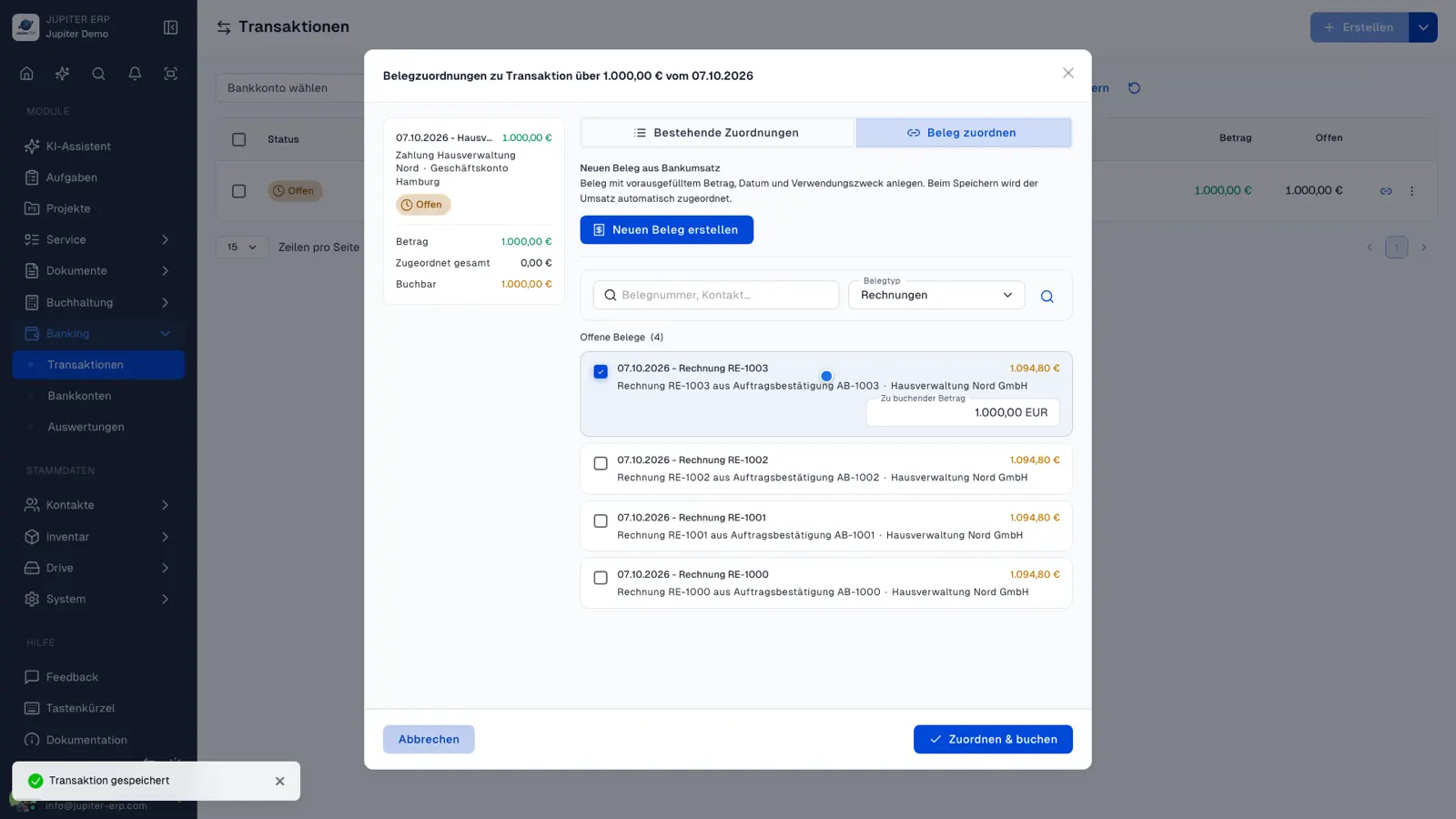
Match open transactions to invoices, credit notes, and dunning — including partial payments and batch allocation. Jupiter suggests matches from amount and payment reference; you review and post in bulk.
Liquidity without mandatory PSD2

There is no automatic live bank connection: an export from online banking is enough. That is deliberately lean — you control import timing and data source without PSD2 interfaces or third-party access.

Banking analytics show cash flow and matching status — a basis for short-term liquidity planning, right next to open items from the documents module.

Features in Banking

What you can do in this module — no fluff. Details for individual panel features are under Features.

  • Bank and payment accounts

    Multiple accounts with balances and currencies. Payment methods and accounts are maintained centrally for the team.

  • CSV import & manual transactions

    Import bank transactions via CSV with column mapping, or capture individual transactions manually and edit them later.

  • Payment matching

    Link receipts to open invoices, credit notes, and dunning — including partial payments, bulk matching, and traceable history.

  • Automatic matching

    Suggestions based on amount and document number in the payment reference — review open transactions in bulk and assign with one click.

  • Banking analytics

    Cash flow, assignment status, and account overview at a glance — a basis for short-term liquidity planning.

Typical use cases

How teams use Banking day to day.

SMBs with multiple business accounts
Teams with high payment volume
Finance leads without a separate banking tool
Jupiter ERP

Ready for Jupiter ERP?

Start for free — choose plan, term, and add-ons in the app afterwards. Custom adaptations or API integration? Get in touch.

Banking & payment matching · Jupiter ERP