Jupiter ERP

Documents

Online signatures

Get quotes and delivery notes signed by link: in minutes instead of days.

You release a document for online signature. The recipient opens the link, signs in the browser, and Jupiter ERP stores the signed PDF including evidence (time, IP, hash of the source document). No printing, no scanning, no account for your customers, and every signature is admissible as evidence as a simple electronic signature under Art. 25 eIDAS.

Note: From Business plan

Online-Signatur am Beleg im Jupiter ERP Panel

At a glance

These are the points this feature covers day to day.

  • Link by email
  • Signed PDF with evidence
  • From Business plan

In the product

The workflow in Jupiter ERP, on this page.

In depth

Background, typical workflows, and concrete panel capabilities, more detail than the summary above.

Release a document for signature

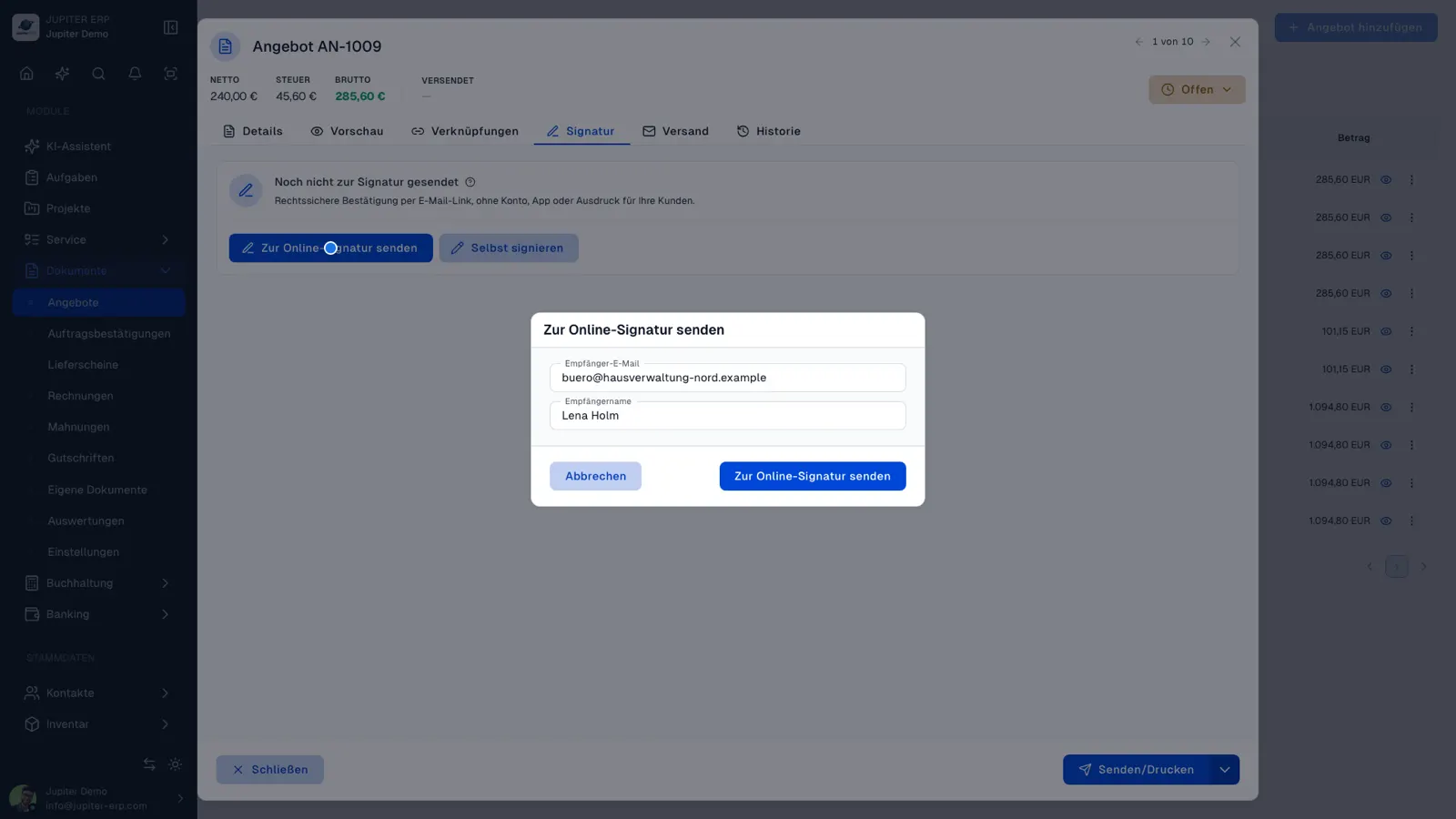
From a commercial document (delivery note, quote, invoice, or custom type) you send an invitation to the stored email. The recipient opens the link without a Jupiter ERP account and sees the PDF to sign.

Open, signed, declined, and expired requests are visible on the document. Resending rotates the link so previous addresses stop working.

Online-Signatur am Beleg im Jupiter ERP Panel

Evidence that holds up in court

The signed PDF replaces the source file and includes an evidence page with timestamp, IP address, and SHA-256 hash of the original document. Any later change becomes detectable, and as a simple electronic signature it is admissible as evidence under Art. 25 eIDAS.

That covers everyday business: accepted quotes, order confirmations, delivery note sign-offs, handover protocols, and consents. Only where the law explicitly requires written form (for guarantees or terminating employment contracts, for example) do you additionally need a qualified signature.

On invoices you can attach the signed file (a signed delivery note, for instance) as an extra attachment, so proof of delivery and invoice reach the customer together.

What you do with online signatures

You send a link, the recipient signs in the browser, and the signed PDF replaces the original file. The customer does not need a Jupiter ERP account.

  • Release a delivery note, quote, invoice, or custom document type for signature
  • Send the invitation to the email stored on the contact
  • See open, signed, declined, and expired requests on the document
  • Send a new invitation; the previous link stops working
  • Keep a proof page with time, IP address, and the SHA-256 hash of the source document
  • Attach signed delivery notes to the invoice as well
  • Use it for quote acceptance, order confirmation, handover, and consent in day-to-day commerce

Where a simple signature is enough

The signature is a simple electronic signature under Art. 25 eIDAS and is admissible as evidence. That covers day-to-day commercial documents.

Where the law expressly requires written form, for example guarantees or termination of employment contracts, you still need a qualified signature. The feature is included from Business and during the trial, with no volume cap.

How it works in the panel

The main building blocks at a glance, complemented by the longer description above.

Release for signature

From the document (e.g. delivery note, quote, invoice) you send an invitation to the stored email. The recipient does not need a Jupiter ERP account.

Sign in the browser

The public page shows the PDF, records consent, and captures the signature by drawing. Declined and expired requests stay visible in the document.

Evidence in the PDF

The signed file replaces the source PDF and adds an evidence page with time, IP, and SHA-256 hash. Signed delivery notes can also be attached to invoices.

Common questions

Jupiter ERP

Your first invoice in minutes

Start for free: write invoices on the Free plan. Choose plan, term, and add-ons in the app afterwards. Custom adaptations or API integration? Get in touch.

  • 14-day trial
  • No credit card
  • Hosted in Germany
  • GDPR-compliant
Online signatures · Jupiter ERP
