Jupiter ERP

Buchhaltung

Expense receipts & inbound e-invoices

Capture inbound documents. Read structured e-invoices automatically.

Capture incoming invoices and receipts for accounting. Jupiter ERP reads structured e-invoices per EN 16931 (ZUGFeRD, XRechnung) automatically and suggests the matching contact and booking account, including cost center and export to your tax advisor.

Kostenbeleg bearbeiten im Jupiter ERP Panel

At a glance

These are the points this feature covers day to day.

  • Automatic extraction
  • Contact & account suggestion
  • Cost centers & export

In the product

The workflow in Jupiter ERP, on this page.

In depth

Background, typical workflows, and concrete panel capabilities, more detail than the summary above.

Capture inbound documents in a structured way

Upload incoming invoices and receipts, assign cost centers, track payment status. Structured e-invoices are read from XML by Jupiter ERP: amounts and parties automatically, without AI.

For scans, AI suggests contact, booking account, and line items; you review and confirm. Duplicate checks reduce double entry.
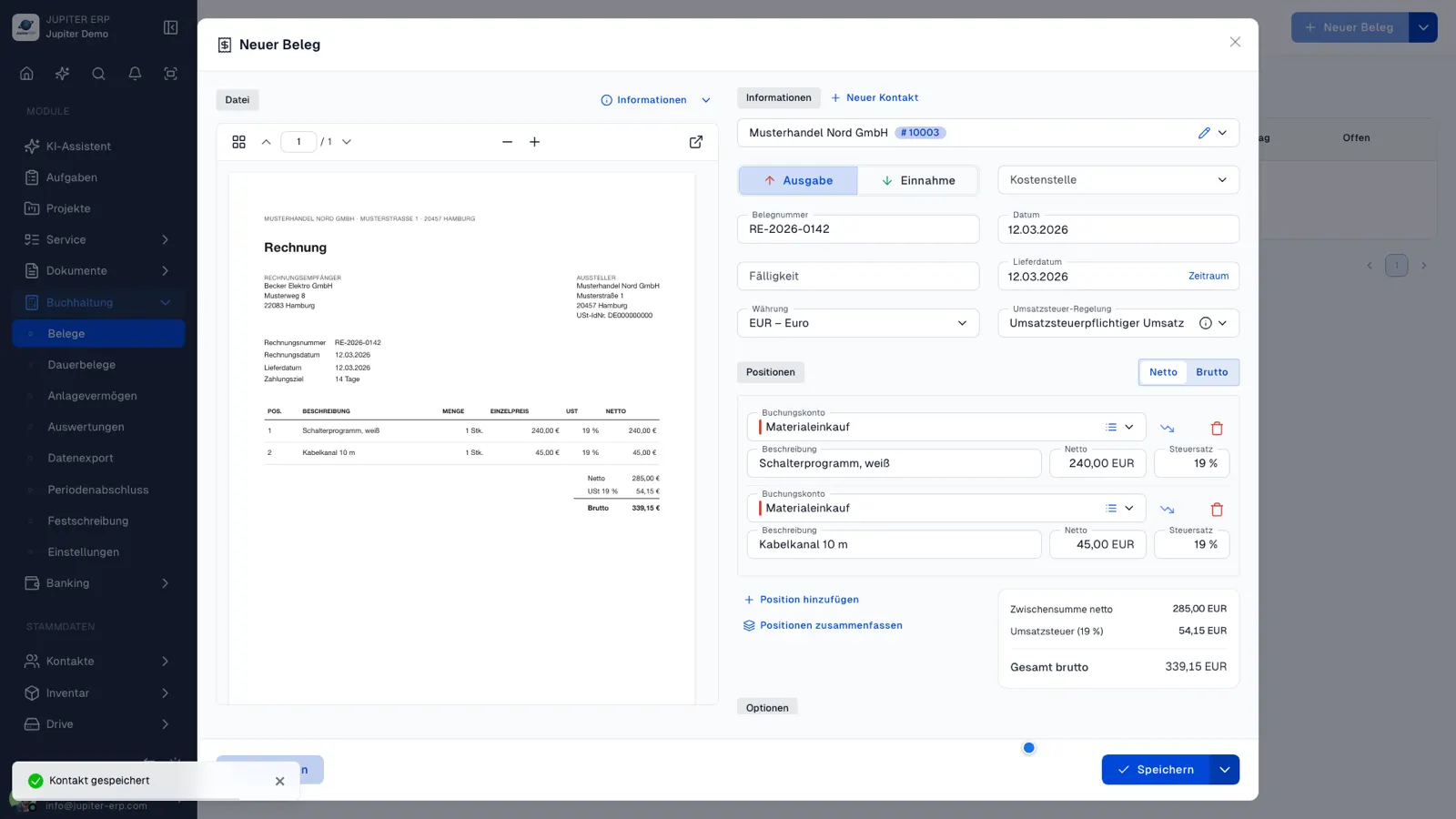

Kostenbeleg bearbeiten im Jupiter ERP Panel

Flow into accounting and DATEV

Captured documents flow into EÜR, P&L, and DATEV export: an end-to-end inbound process instead of folders and email attachments to your tax advisor without structure.

What you do with a cost document

Incoming invoices and receipts become accounting documents. Structured e-invoices fill the fields from the XML. Scans get suggestions you confirm.

  • Upload a PDF, photo, or XML, or let the inbox address create the draft
  • Read ZUGFeRD and XRechnung: amounts, date, parties
  • Get a suggested contact and posting account, including cost center
  • Review lines, correct them, and release the document
  • Track payment status and spot duplicates
  • Mark individual lines as fixed assets
  • Send the document into the cash-basis statement, P&L, BWA, SuSa, open items, and the DATEV export
  • Scan a draft in the companion app and post it in the panel

Incoming documents without a folder

The document stays on the contact and the posting account. The adviser receives it in the export, not as a loose email attachment.

AI suggestions on scans do not replace review. You confirm what gets posted.

How it works in the panel

The main building blocks at a glance, complemented by the longer description above.

Capture receipt

Upload incoming invoices and receipts and assign them to accounting.

Read e-invoice

ZUGFeRD/XRechnung XML is detected; amounts, dates, and parties are taken over automatically.

Suggestions

The matching contact and booking account are suggested, including cost center.

Export

Expense receipts flow into the accounting and DATEV export.

Common questions

Jupiter ERP

Your first invoice in minutes

Start for free: write invoices on the Free plan. Choose plan, term, and add-ons in the app afterwards. Custom adaptations or API integration? Get in touch.

  • 14-day trial
  • No credit card
  • Hosted in Germany
  • GDPR-compliant
Expense receipts & inbound e-invoices · Jupiter ERP
