Jupiter ERP

Buchhaltung

Recurring receipts

Set up recurring inbound receipts once. Jupiter ERP generates them on schedule.

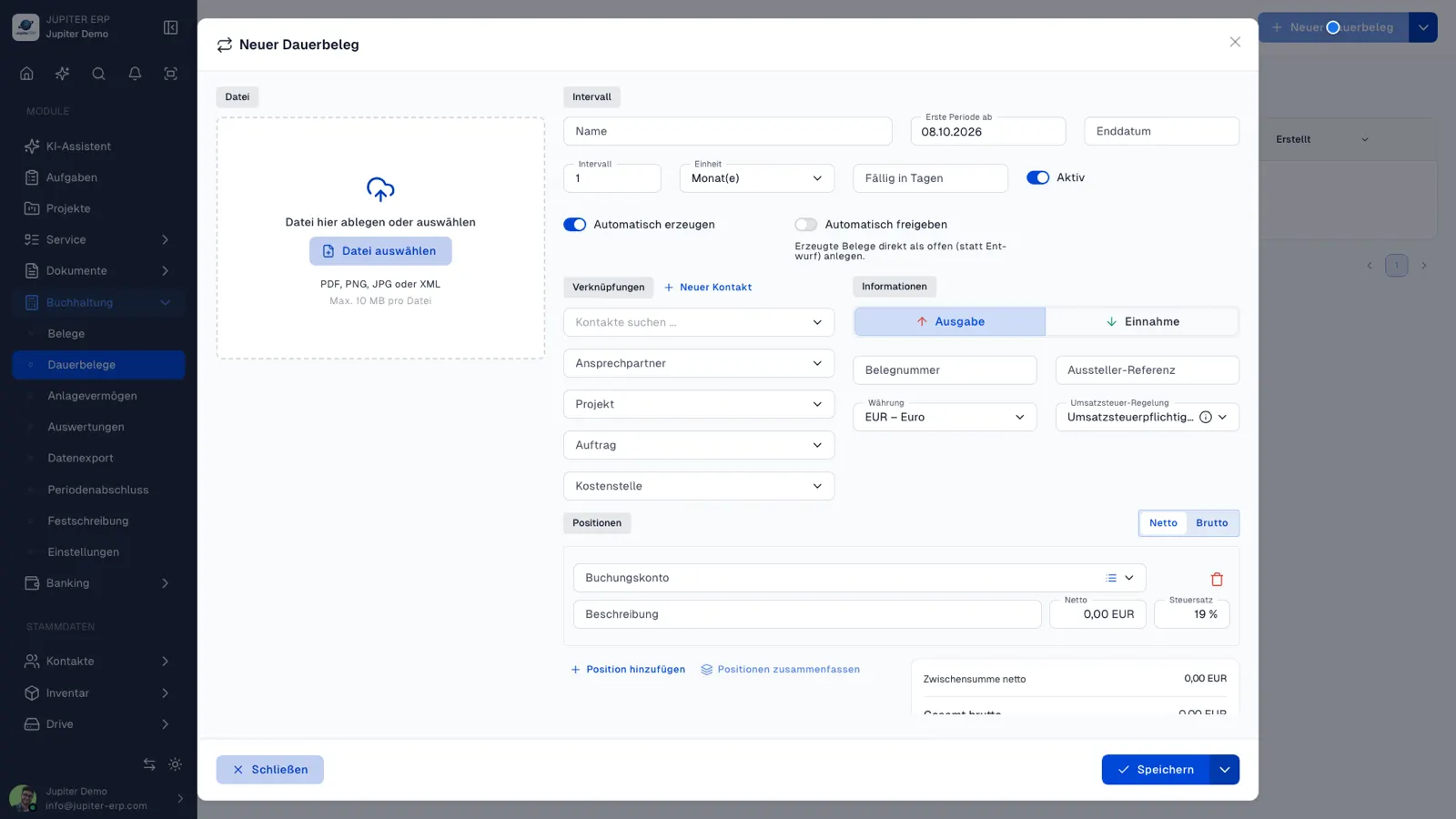
Create recurring receipt templates with full receipt fields, interval, and start date. Jupiter ERP generates receipts automatically when due: as draft or approved. Attachments and e-invoice data can carry over from the template; generated receipts stay linked to the recurring template.

Note: Enterprise & trial

Dauerbelege im Jupiter ERP Panel

At a glance

These are the points this feature covers day to day.

  • Automatic generation
  • Intervals like service contracts
  • Link back to template

In the product

The workflow in Jupiter ERP, on this page.

In depth

Background, typical workflows, and concrete panel capabilities, more detail than the summary above.

Templates instead of monthly re-entry

Set up rent, leasing, subscriptions, or recurring supplier invoices once as a recurring receipt template, with interval, start date, and full receipt fields. Jupiter ERP generates receipts automatically when due.

Optionally attach a file to the template; when generating, the file is copied to the new receipt. Structured e-invoices are read like regular expense receipts.

Dauerbelege im Jupiter ERP Panel

Control and traceability

Per template you choose whether generated receipts are created as draft or approved. The detail page shows the next run and all receipts already generated: each receipt links back to its recurring template.

You can trigger the next receipt manually at any time. Included in Enterprise and trial; requires the expense receipts module.

What you control on a recurring document

Rent, leasing, subscriptions, and recurring supplier invoices are set up once. Jupiter ERP creates the document on the interval.

  • Maintain contact, amounts, posting accounts, and cost center on the template
  • Set interval and start date
  • Choose whether new documents are drafts or already released
  • Optionally attach a file to the template; it is copied onto the new document
  • Read structured e-invoices on creation the same way as for cost documents
  • See the next run on the detail view
  • Trigger the next document manually
  • Trace created documents back to the template

Plan and existing records

Recurring documents are included during the trial and on Enterprise, and they require the cost-document module.

If the trial ends without Enterprise, active recurring documents are deactivated. Documents already created remain.

How it works in the panel

The main building blocks at a glance, complemented by the longer description above.

Create template

Maintain contact, amounts, booking accounts, cost center, and interval in one recurring receipt template.

Automatic run

Due recurring receipts are processed in the background: the next run is visible on the detail page.

Trigger manually

Generate the next receipt for a period at any time, e.g. to test the template.

Attachment & e-invoice

Optionally attach a file to the template; when generating, the attachment is copied to the new receipt. Structured e-invoices are read like regular expense receipts.

Common questions

Jupiter ERP

Your first invoice in minutes

Start for free: write invoices on the Free plan. Choose plan, term, and add-ons in the app afterwards. Custom adaptations or API integration? Get in touch.

  • 14-day trial
  • No credit card
  • Hosted in Germany
  • GDPR-compliant
Recurring receipts · Jupiter ERP