Jupiter ERP

Buchhaltung

Depreciation & fixed assets

Capture investments, plan depreciation: directly on the expense receipt.

Mark individual line items on expense receipts as fixed assets and choose linear depreciation or immediate GWG write-off. Jupiter ERP calculates the monthly depreciation schedule, shows acquisition value and book value in the fixed-assets overview, and includes depreciation in EÜR, P&L, BWA, SuSa, and DATEV export.

Note: Enterprise & trial

Anlagevermögen und Abschreibungen im Jupiter ERP Panel

At a glance

These are the points this feature covers day to day.

  • Linear depreciation & GWG
  • Schedule per line item
  • EÜR, P&L, BWA, SuSa & DATEV

In the product

The workflow in Jupiter ERP, on this page.

In depth

Background, typical workflows, and concrete panel capabilities, more detail than the summary above.

Fixed assets directly on the expense receipt

Capture investments as expense receipts as usual, and mark individual line items as fixed assets. Mixed receipts with operating expense and acquisition lines are supported; depreciation is tied to each line item, not a separate document type.

Choose linear depreciation with useful life or immediate GWG write-off. The depreciation account is derived from the selected asset account; the schedule starts on the receipt date.
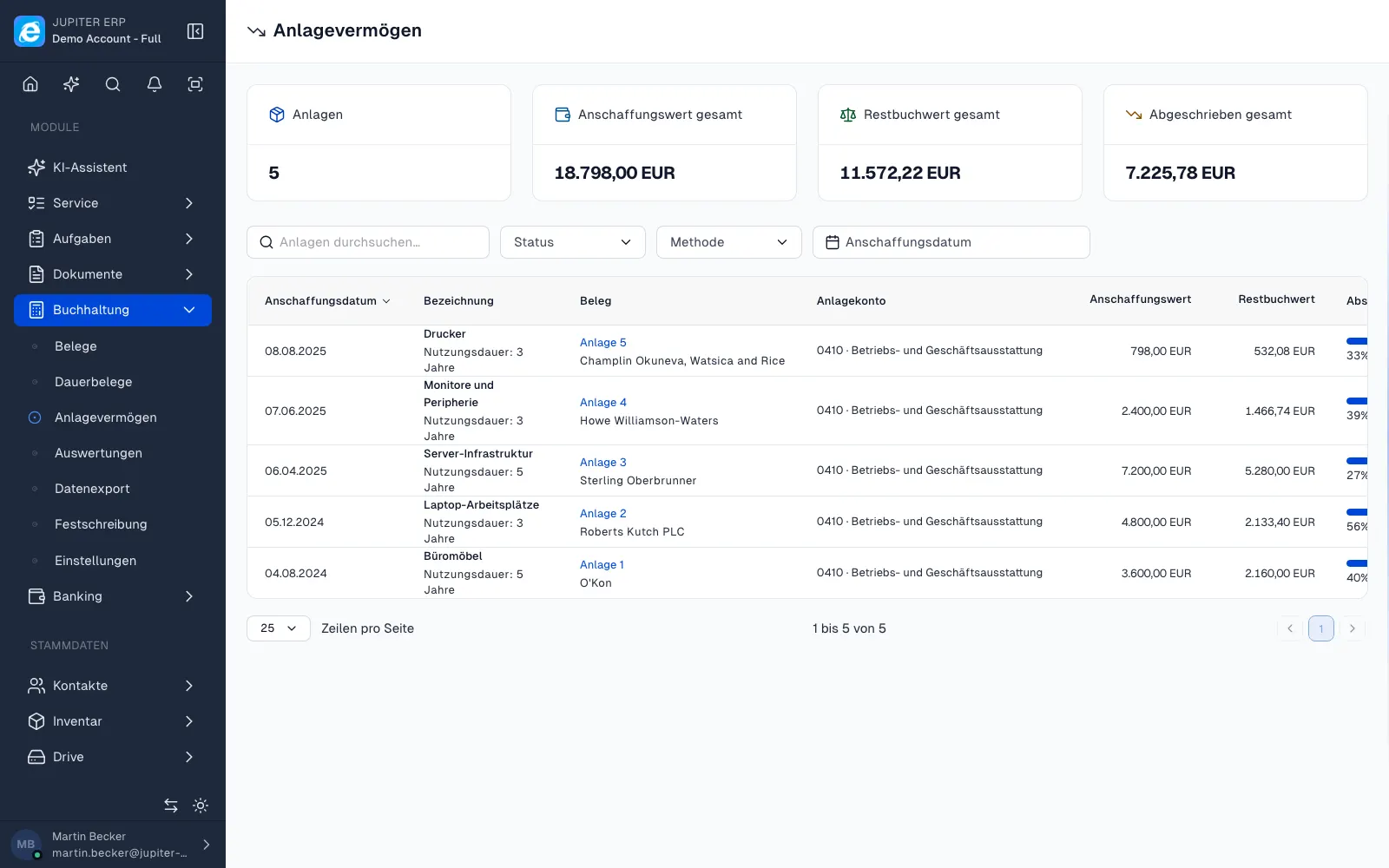

Anlagevermögen und Abschreibungen im Jupiter ERP Panel

Schedule, overview, and reports

The fixed-assets overview lists all assets with acquisition value, book value, and method. Open the monthly depreciation schedule per line item.

Depreciation flows into EÜR, P&L, BWA, and SuSa; DATEV export includes depreciation postings for the selected period. Included in Enterprise and trial; requires the expense receipts module.

What you do with a fixed asset

You mark a line on the cost document. Jupiter ERP calculates the schedule and shows the remaining book value. Expense and investment can sit on the same document.

  • Mark a line as a fixed asset and choose an asset account
  • Straight-line depreciation with a useful life, or low-value asset with immediate write-off in the acquisition month
  • Let the depreciation account be derived from the asset account
  • See the monthly schedule from the document date
  • Open the list of all assets with acquisition value and remaining book value
  • Show depreciation in the cash-basis statement, P&L, BWA, and SuSa
  • Include depreciation postings in the DATEV export for the period

Small businesses and the plan

Under standard VAT the depreciation base is net. For small businesses under §19 UStG, non-deductible input tax is part of acquisition cost, so the base is gross. The low-value threshold of 800 euro is checked on the net amount.

Included in the trial and on Enterprise, provided the cost-document module is active. After the trial without Enterprise, new depreciation is blocked; existing schedules remain. Methods other than straight-line and low-value assets are not included.

How it works in the panel

The main building blocks at a glance, complemented by the longer description above.

Per receipt line

Mark fixed assets directly on expense receipt line items: mixed receipts with expense and investment lines are supported.

Linear depreciation & GWG

Linear depreciation with useful life or immediate GWG write-off in the acquisition month: the depreciation account is derived from the asset account.

Fixed-assets overview

All assets with acquisition date, acquisition value, book value, and method: view the depreciation schedule per line item.

Small business & regular taxation

Under regular taxation, depreciation is calculated on the net amount; for small businesses (§19 UStG) the non-deductible input VAT is part of the acquisition cost, so the depreciation base is gross.

Reports & export

Depreciation flows into EÜR, P&L, BWA, and SuSa; DATEV export includes depreciation postings for the selected period.

Common questions

Jupiter ERP

Your first invoice in minutes

Start for free: write invoices on the Free plan. Choose plan, term, and add-ons in the app afterwards. Custom adaptations or API integration? Get in touch.

  • 14-day trial
  • No credit card
  • Hosted in Germany
  • GDPR-compliant
Depreciation & fixed assets · Jupiter ERP
