Jupiter ERP

Buchhaltung

EÜR, P&L, BWA, SuSa & OPOS

Profit statements and open items from your documents, without a separate ledger tool.

Cash-basis profit statement by payment date, P&L by document date, monthly BWA, sums and balances, and open items with ageing. All reports read the same expense receipts, invoices, and depreciation, with CSV and PDF export. For small-business VAT exemption (§19 UStG), Jupiter ERP shows gross amounts without separate input-VAT lines.

Note: EÜR & P&L from Business · BWA, SuSa & OPOS in Enterprise and trial

Buchhaltungsberichte (EÜR) im Jupiter ERP Panel

At a glance

These are the points this feature covers day to day.

  • EÜR & P&L
  • BWA, SuSa & OPOS
  • CSV and PDF export
  • Cost-center filter

In the product

The workflow in Jupiter ERP, on this page.

In depth

Background, typical workflows, and concrete panel capabilities, more detail than the summary above.

Five reports, one document set

EÜR follows payment date, P&L follows document date. BWA condenses the same records per month and cumulatively for the year. SuSa shows debit, credit, and balance per account. OPOS shows open receivables and payables at a cut-off date. CSV and PDF export come with every report.

For small-business VAT exemption (§19 UStG), Jupiter ERP shows gross amounts without separate input-VAT lines. Which statement is authoritative for tax is a question for your advisor.
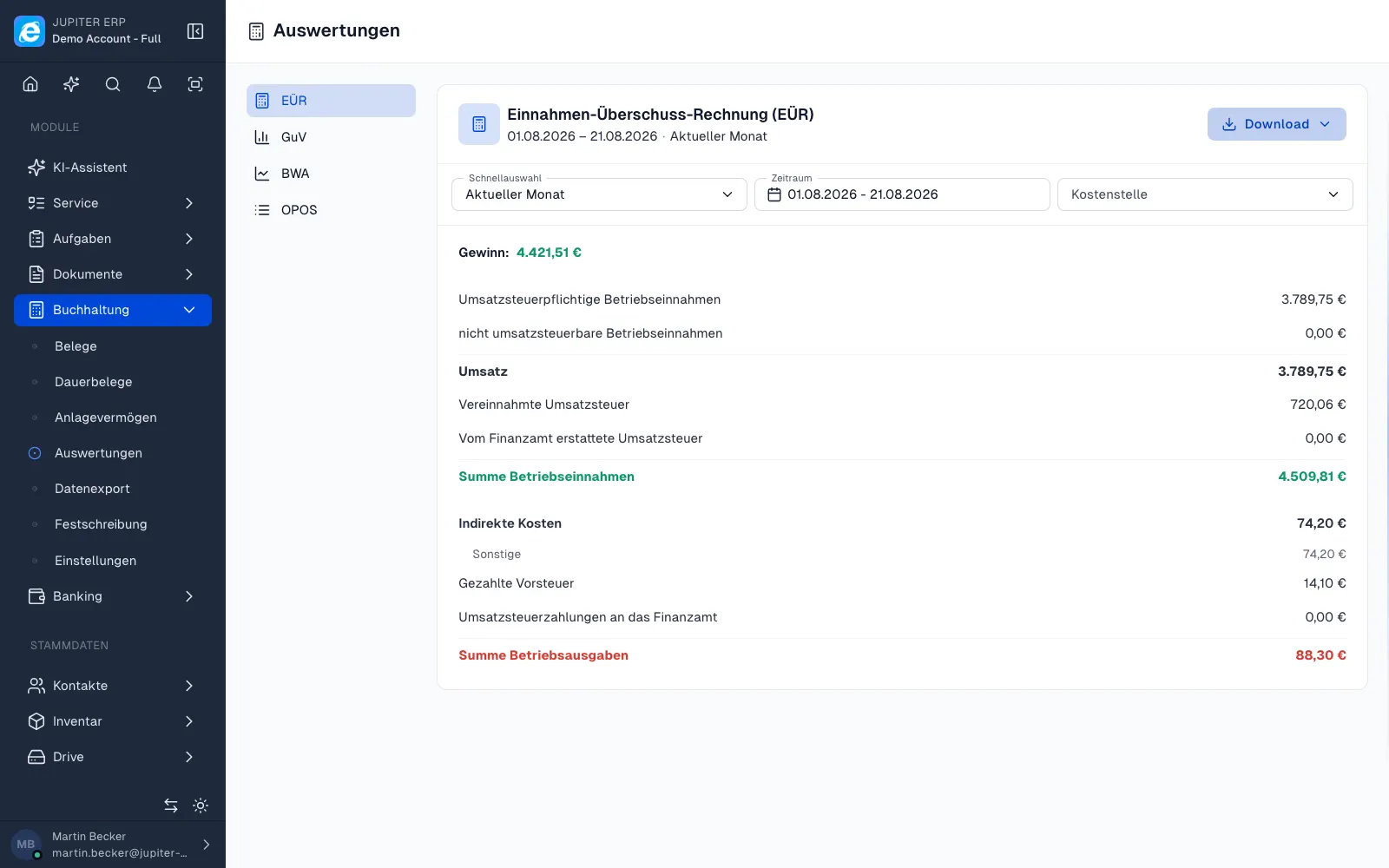

Buchhaltungsberichte (EÜR) im Jupiter ERP Panel

No second ledger for the overview

The reports read expense receipts, outgoing documents, and depreciation from Jupiter ERP. Cost-center filters use the same master as receipt capture, without export to a separate controlling tool for the internal view.

EÜR: profit by cash in and out

The cash-basis profit statement counts operating income and expenses by payment date (§11 EStG). Partial payments count proportionally: if an invoice is half paid, half counts. Only payments reconciled through the bank are included.

  • Operating income and expenses by payment date
  • Partial payments proportional to the open amount
  • Depreciation (AfA) per period, not by payment
  • Purchased fixed assets count through depreciation, not as an immediate expense
  • Received and paid VAT as separate cash-flow lines
  • VAT prepayment and refund to the tax office shown separately
  • Import VAT as deductible input VAT (§15 UStG)

P&L: accrual by document date

The profit and loss statement assigns each document to its document date, regardless of payment. It shows net figures without the VAT cash-flow lines of the EÜR.

  • Income and expenses by document date
  • Grouped into direct costs (personnel), indirect costs, and depreciation
  • Private shares, transit accounts, and VAT accounts stay out

BWA: short-term result report, DATEV style

The management report condenses the same records in the DATEV-style line order. Each report has two columns: the selected month and the year to date up to that month.

  • Total performance from revenue, inventory change, and capitalised own work
  • Gross profit and operating gross profit as subtotals
  • Cost types: personnel, premises, vehicle, advertising and travel, insurance, depreciation, and more
  • Operating result, result before tax, and preliminary result as KPIs
  • Neutral section for interest, taxes, and imputed costs
  • Percentage columns: share of total performance, total costs, and personnel costs
  • Basis follows profit determination: cash for EÜR tenants, document date for accrual

SuSa: sums and balances per account

The sums-and-balances list shows each account with its opening balance, debit and credit for the period, cumulative totals, and the balance. Output VAT and input VAT sit on the tax accounts of the chart of accounts.

  • Opening balance of balance-sheet accounts from postings before the fiscal year starts; income-statement accounts start at 0
  • Prior-year result as an opening balance on profit carried forward (SKR03 0860, SKR04 2970)
  • Debit and credit for the selected period, cumulative from the start of the fiscal year
  • Balance marked S for debit and H for credit
  • Personal accounts via the debtor and creditor numbers of the contacts
  • Filter by period, account class, account-number range, and cost center
  • Individual postings per account with document, contra account, and amount

OPOS: open items with ageing

The open-items list shows what is still outstanding at a freely chosen cut-off date. Later payments are not counted; the status is the one at the cut-off date.

  • Receivables from invoices and credit notes, payables from expense receipts
  • Ageing: not due, 1 to 30, 31 to 60, 61 to 90, and over 90 days
  • Grouped per contact with debtor or creditor number
  • Dunning level per open invoice
  • Filter by contact, by side (receivables or payables), and overdue only
  • Open amount exactly at the cut-off date, partial payments included

The same for every report

All reports read the same expense receipts, outgoing documents, credit notes, and depreciation from Jupiter ERP. No second data set, no manual transfer.

  • CSV and PDF for each report
  • Restrict P&L, BWA, and SuSa by cost center
  • Charts of accounts SKR03 and SKR04
  • Foreign-currency documents converted to euros at the document rate; OPOS shows original and euro amount
  • Small businesses under §19 UStG in gross, without separate input-tax lines

Plans and the tax adviser

EÜR and P&L belong to the accounting module from Business. BWA, sums and balances, and open items are included in Enterprise and during the trial.

Which report is decisive for tax remains a question for the adviser. The reports do not replace that conversation. For the handover you also use the DATEV export.

How it works in the panel

The main building blocks at a glance, complemented by the longer description above.

EÜR

Profit by cash in and out: operating income and expenses by payment date.

P&L (GuV)

Accrual profit and loss by document date, grouped by booking accounts.

SuSa

Sums and balances with debit, credit and balance per account, opening balance and VAT accounts. Filter by period, account class and cost center.

BWA

Management report in the DATEV-style line order, two columns per report: selected month and year to date, with percentage KPIs.

OPOS

Open items for receivables and payables with ageing at a cut-off date: invoices, credit notes, and expense receipts, grouped per contact with dunning level.

Common questions

Jupiter ERP

Your first invoice in minutes

Start for free: write invoices on the Free plan. Choose plan, term, and add-ons in the app afterwards. Custom adaptations or API integration? Get in touch.

  • 14-day trial
  • No credit card
  • Hosted in Germany
  • GDPR-compliant
EÜR, P&L, BWA, SuSa & OPOS · Jupiter ERP
