Jupiter ERP

Documents

Recurring invoices

Set up a retainer, subscription, or flat fee once. Jupiter ERP writes the next invoice.

Create recurring invoices with an interval, line items, and texts. Jupiter ERP generates due invoices automatically or on demand, as a draft to review or sent by email. Number range, layout, and e-invoice follow the same rules as any other outgoing invoice.

Note: Enterprise and trial

Serviceverträge im Jupiter ERP Panel

At a glance

These are the points this feature covers day to day.

  • Intervals in days, weeks, months, or years
  • Draft or send by email
  • Prefill lines and texts once

In depth

Background, typical workflows, and concrete panel capabilities, more detail than the summary above.

The same service, the next period

A retainer, a software subscription, or a flat maintenance fee has the same lines, the same customer, and the same payment terms every month. Recurring invoices store exactly that: interval, term, and the preset for subject, texts, and line items.

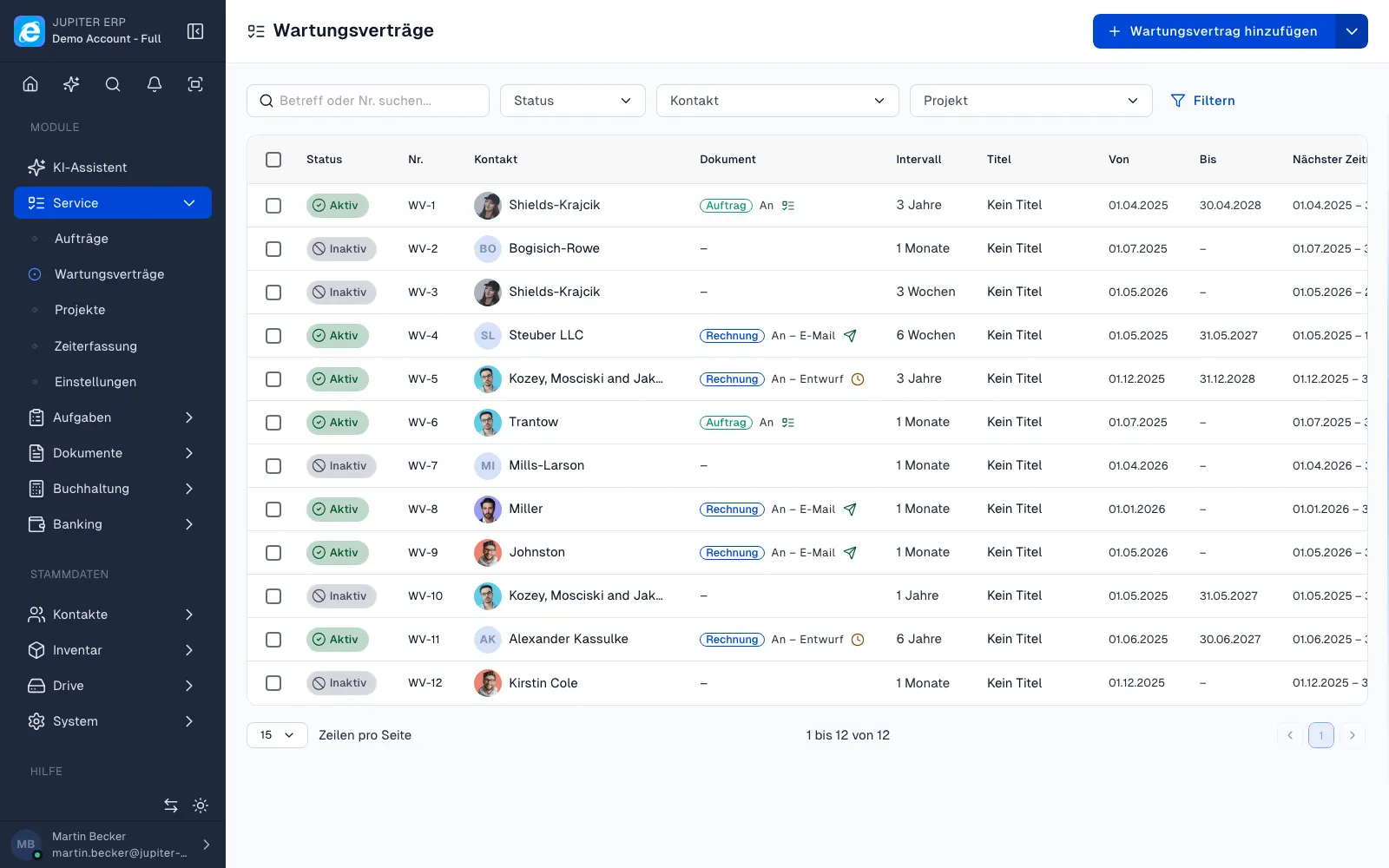
You set this up under Service as a maintenance contract with contract type invoice. Jupiter ERP checks hourly whether a period is due and creates the invoice. On demand you use Create next invoice, without waiting for the next run.

Serviceverträge im Jupiter ERP Panel

Review a draft or send it straight away

On each contract you choose whether the invoice is created as a draft or saved and sent by email. The email template, recipients, and a copy to yourself live on the contract. Sending stays traceable even when nobody opens the invoice by hand.

You set the invoice date to the first day, the middle, or the last day of the period. Jupiter ERP creates it once that day is reached. The list shows the next creation and the next period, plus filters for overdue dates.

After that, a normal outgoing invoice

The generated invoice hangs on the contact and the contract. Number range, letterhead, and the tenant e-invoice default apply as they do for a one-off invoice. GiroCode and the other print options come from the preset on the contract.

You match open amounts in payment reconciliation. Dunning and credit notes are derived from the invoice. When the term ends, set an end date or the status to inactive. Invoices already created stay in the archive.

What you set on a recurring invoice

The template is a maintenance contract with type invoice. Each period becomes an outgoing invoice, with the same line items, until you change the template.

  • Set contact, title, status, and an optional end date
  • Choose an interval in days, weeks, months, or years, for example every 3 months
  • Prefill line items, subject, header, footer, and payment terms
  • Place the invoice date on the first day, the middle, or the last day of the period
  • Set automation to draft, or save and send by email
  • Store the email template, recipients, and a copy to yourself
  • Optionally assign a project, cost center, and service assets
  • Create the next invoice manually or wait for the hourly run
  • Filter the list by next creation, next period, and overdue dates

Plan, and what remains after the trial

Recurring invoices belong to the service area and are included in the trial and the Enterprise plan. Free, Basic, and Business do not include them.

If the trial ends without Enterprise, Jupiter ERP sets active contracts to inactive. Invoices already created keep their number, status, and payment history.

How it works in the panel

The main building blocks at a glance, complemented by the longer description above.

Set up once

Store contact, term, interval, and line items on a contract with type invoice. Subject, header and footer, payment terms, and print options apply to every period.

Create the due invoice

With automation on, Jupiter ERP checks due periods hourly. The invoice is created as a draft or saved and sent by email. You can also start it manually with Create next invoice.

Invoice date inside the period

You choose whether the date falls on the first day, the middle, or the last day of the period. Jupiter ERP creates the invoice once that day is reached.

The same invoice as usual

The generated invoice uses the tenant number range, letterhead, and e-invoice default. Payment matching, dunning, and credit notes work as they do for an invoice you wrote by hand.

Common questions

Jupiter ERP

Your first invoice in minutes

Start for free: write invoices on the Free plan. Choose plan, term, and add-ons in the app afterwards. Custom adaptations or API integration? Get in touch.

  • 14-day trial
  • No credit card
  • Hosted in Germany
  • GDPR-compliant
Create recurring invoices automatically · Jupiter ERP