Jupiter ERP

Documents

SEPA direct debit (pain.008)

Turn open invoices into a direct-debit file for your banking software.

Store IBAN and mandate data on the contact, select invoices with an open amount, and generate a SEPA pain.008 file (CORE, recurrent). Creditor details come from account settings and can be adjusted for the export. Import the file into your banking software.

SEPA-Lastschrift-Export im Jupiter ERP Panel

At a glance

These are the points this feature covers day to day.

  • pain.008.001.02 for DACH banking software
  • Mandate reference and date on the contact
  • Filter by payment method on the invoice list

In the product

The workflow in Jupiter ERP, on this page.

In depth

Background, typical workflows, and concrete panel capabilities, more detail than the summary above.

Direct debit as a file, not a bank connection

Jupiter ERP builds a SEPA bulk direct debit in pain.008.001.02 format (CORE, sequence type RCUR) from selected invoices with an open amount. You import the XML into your banking software and match the later statement in payment reconciliation.

Mandate data lives on the contact: IBAN, optional account holder, mandate reference, and signature date. They flow into the pain.008 export.
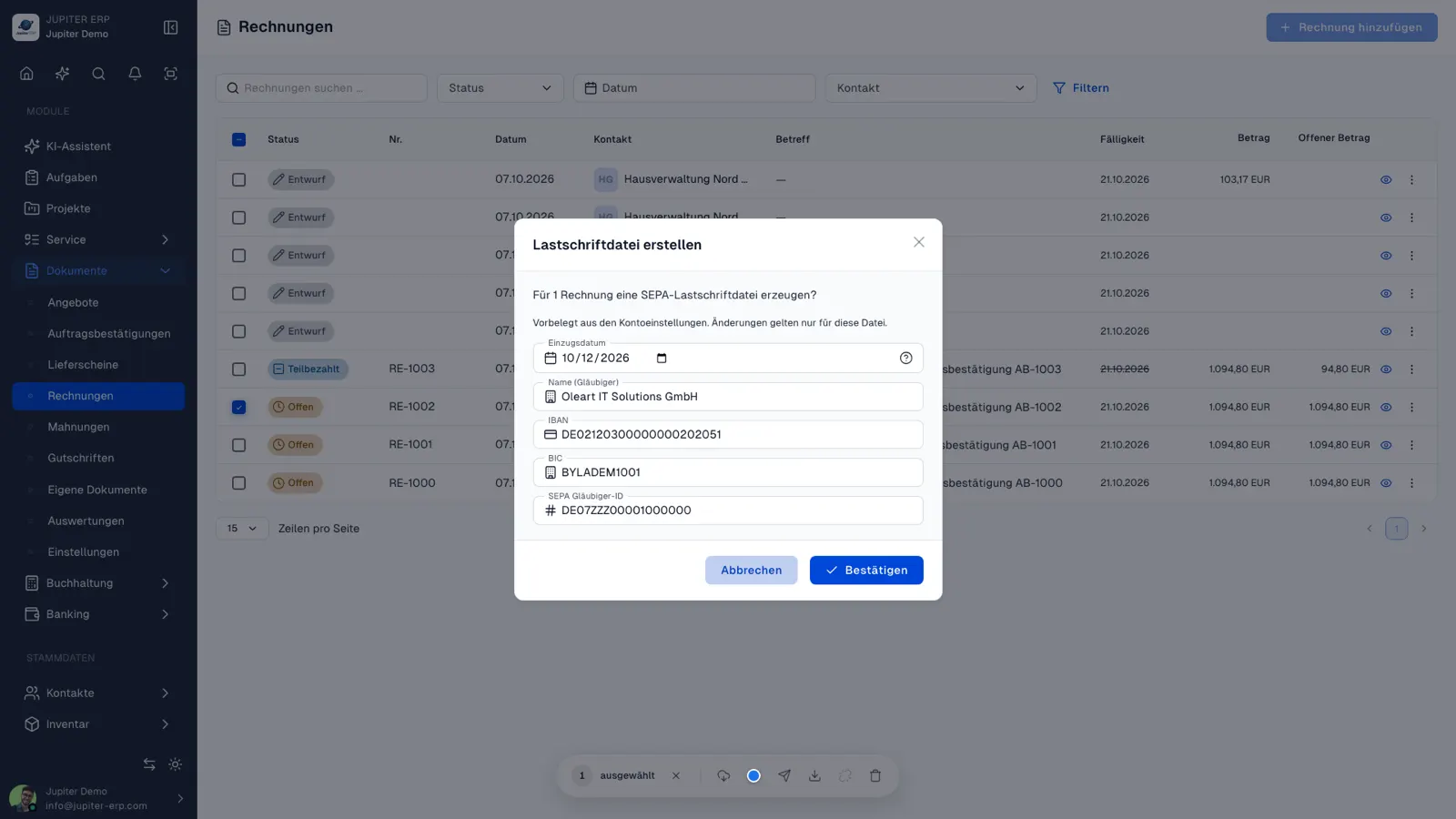

SEPA-Lastschrift-Export im Jupiter ERP Panel

From the invoice list in a few steps

Optionally filter by payment method, select documents, then the bulk action “Download direct debit”. In the dialog you review collection date and creditor fields: prefilled from account settings, editable only for this file.

After collection, match the bank statement in payment matching so the invoice payment status updates.

What you do with the direct-debit file

You produce an XML file for your banking software, import it there, and match the later statement in payment reconciliation.

  • Store IBAN, optional account holder, mandate reference, and mandate date on the contact
  • Filter the invoice list by payment method
  • Select documents with an open amount, up to 500 invoices in one file
  • Create pain.008.001.02, direct debit type CORE, sequence type RCUR
  • Check collection date, creditor name, IBAN, BIC, and creditor ID in the dialog
  • Take creditor fields from account settings and change them only for this file
  • Import the file into your banking software
  • Match the later statement in payment reconciliation

Mandate data on the contact

IBAN, optional account holder, mandate reference, and mandate date live on the contact and flow into the export.

You start the download in the panel from the invoice list.

How it works in the panel

The main building blocks at a glance, complemented by the longer description above.

Mandate data on the contact

Account holder, mandate reference, and signature date sit on the contact next to IBAN and BIC.

Filter and select invoices

Optionally filter by payment method, select documents with an open amount, and generate the direct-debit file via bulk action: up to 500 invoices.

Collection date and creditor

In the dialog, review collection date, creditor name, IBAN, BIC, and creditor identifier. Prefills from account settings; changes apply only to this file.

Then payment matching

Import the XML file into your banking software. Invoices stay open until you match the incoming payment in payment matching.

Common questions

Jupiter ERP

Your first invoice in minutes

Start for free: write invoices on the Free plan. Choose plan, term, and add-ons in the app afterwards. Custom adaptations or API integration? Get in touch.

  • 14-day trial
  • No credit card
  • Hosted in Germany
  • GDPR-compliant
SEPA direct debit (pain.008) · Jupiter ERP
