

Free invoicing software
Free invoicing software
Write invoices in the browser, no forced subscription. After a 14-day trial, the Free plan stays permanently free: invoices, contacts, and text templates for small volumes.
Create invoices in the browser, no install
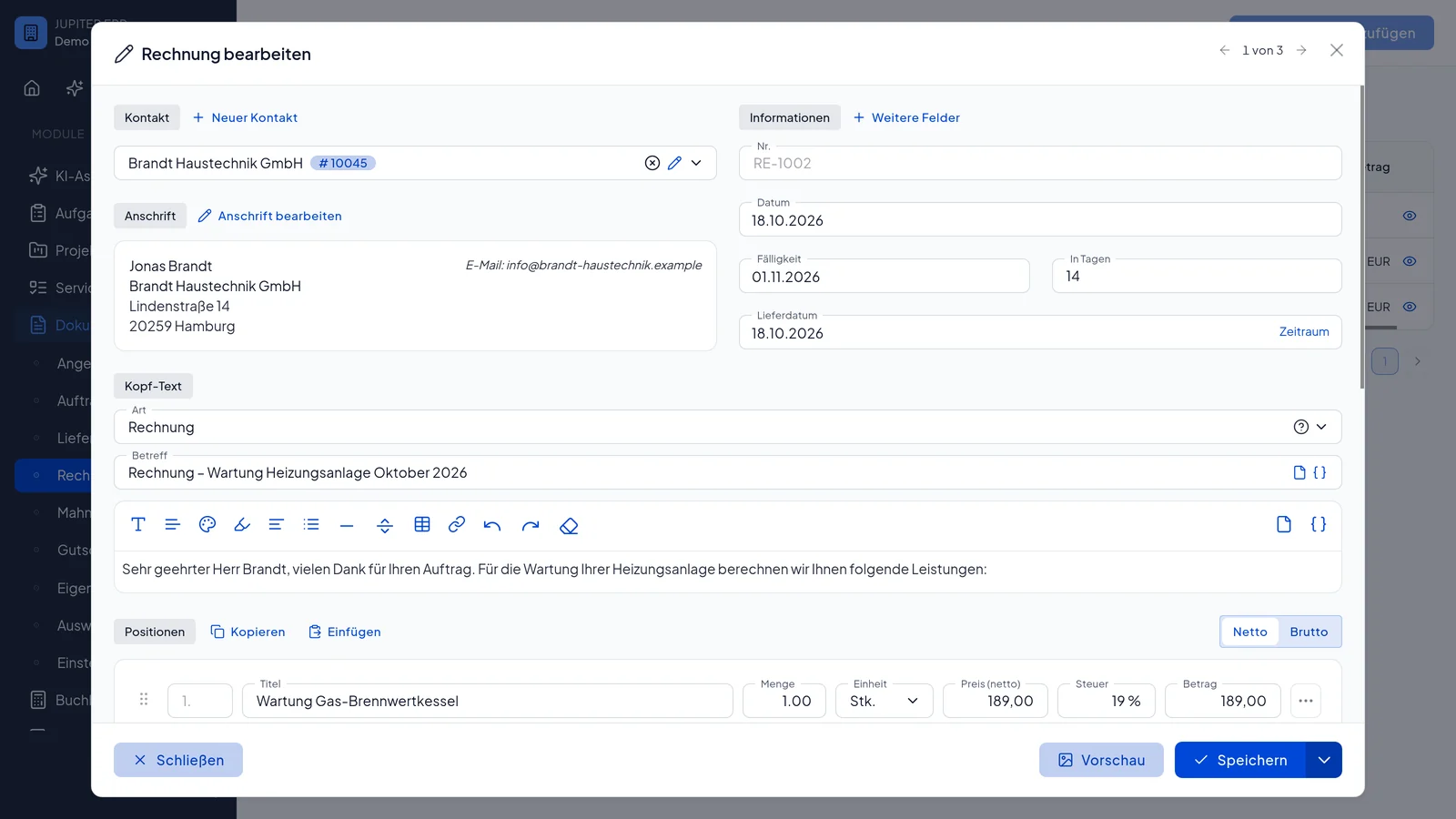
Pick a contact, add line items, generate a PDF. Jupiter ERP keeps number ranges and status in your account. No more Word templates.
- Outgoing invoices with line items, tax, and due dates
- Generate a PDF in the browser, no desktop software
- Reuse contacts and text templates instead of retyping every time
What you can do on the Free plan
Free is real invoicing software for small volumes, not just a demo. After the trial, invoices, templates, and tasks stay permanently free.
Write invoices
Capture line items, tax, and due dates. Each invoice gets a sequential number and a clear status.
Generate PDFs
The finished invoice lives as a PDF in your account. Download it or send it on to your customers.
Manage contacts
Store up to 10 contacts and reuse them on invoices. No re-entering address and tax IDs every time.
Use text templates
Save recurring intro and footer text as templates instead of writing every invoice from scratch.
Tasks and time
Tasks and time tracking stay on Free alongside invoices, useful when you later turn work into line items.
Start without a credit card
Sign-up takes minutes. No card is stored, and nothing is billed automatically after the trial.
Free plan
Honest limits, so you know what you get
Free does not mean unlimited. The plan fits if you write a few invoices a month. When you grow, you move to a paid package without losing data.
- 1 user
- 10 contacts
- 5 documents per month
- 100 MB storage
- Invoices, text templates, tasks, and time tracking
New accounts start with 14 days of full functionality, including quotes, e-invoicing (ZUGFeRD), and further modules. After that you stay on Free unless you choose a paid package.
Who this free invoicing software is for
If you need an online tool to write invoices occasionally, Free is enough. When quotes, dunning, banking, or DATEV enter the picture, you scale in the same system.
Freelancers and side work
A few invoices a month, clean PDFs, no Excel chaos, and no subscription while volume stays small.
Founding and getting started
Try first, decide later. The trial shows the full product; Free then keeps invoicing running. The founder page covers the small-business exemption, e-invoices, and plan limits.
Small volume, room to grow
Contacts and documents stay in the account. Move to Basic or Business later when quotes, DATEV, or extra users arrive.
Get started in three steps
From search result to first invoice, no sales call and no payment details.
Register for free
Create an account, no credit card. You start in the 14-day trial.
Write your first invoice
Add a contact, capture line items, check the preview. The panel walks you through required fields.
Use the PDF and continue
Save or send the invoice as a PDF. After the trial you keep writing invoices on Free, within the plan limits.
Why use free invoicing software in the cloud?
Many sole traders look for free invoicing software because Word templates are error-prone and desktop tools need a local install. An online invoicing tool keeps number ranges, contacts, and PDFs in one place, available in the browser, with no installation.
Jupiter ERP provides that with a permanently free plan: write invoices, keep contacts, use text templates. Limits are deliberately small (5 documents per month, 10 contacts, 1 user) so the offer stays a real starting point, not a time-boxed trick.
You turn the e-invoice (ZUGFeRD) on for the invoice, including on Free. Quotes start at Basic, the cash-basis profit statement and DATEV export at Business, dunning at Enterprise. Master data stays in the account when you change plans.
Frequently asked questions
- Is the invoicing software really free?
- Yes. After a 14-day trial you move to the Free plan: permanently free, no credit card, no automatic billing. It includes invoices, text templates, tasks, and time tracking, limited to 1 user, 10 contacts, 5 documents per month, and 100 MB of storage.
- Do I need to register to write invoices?
- Yes. Unlike the e-invoice viewer, invoicing runs in the panel: your documents, contacts, and number ranges belong to your account. Registration is free.
- How many invoices can I create on Free?
- Free includes 5 documents per month. That fits occasional outgoing invoices. For higher volume, choose a paid package or add document quota as an add-on. Details are on the pricing page.
- Can I write e-invoices (ZUGFeRD) on Free?
- Yes. On the invoice, Jupiter ERP embeds ZUGFeRD 2.x in the PDF, including on Free. Setup turns the e-invoice on by default. Quotes start at Basic. Dunning starts at Enterprise.
- Do I need a credit card?
- No. You do not store payment details for the trial or the Free plan. You only subscribe to a paid package when you choose to.
- Who is this free invoicing software for?
- Freelancers, founders, and small businesses who need an online tool to write invoices and only issue a few documents a month. If you need a team, banking, DATEV, or service processes, start here anyway and extend later.

Your first invoice in minutes
Start for free: write invoices on the Free plan. Choose plan, term, and add-ons in the app afterwards. Custom adaptations or API integration? Get in touch.
- 14-day trial
- No credit card
- Hosted in Germany
- GDPR-compliant
